Offline Evidence of Authorship: Inside ValidDraft for Mac
This morning - August 4, 2026 - we wrote a short manuscript called The monsoon mystery in ValidDraft for Mac, sealed its first chapter, and published certificate MU1OJA. Every screenshot below comes from that session, and the certificate is live, so you can check this post’s claims yourself. Here is the evidence trail the app builds while you write - and why almost none of it needs an internet connection.
You write; the rhythm, pauses and corrections become evidence. Each sealed chapter is hashed, the hashes bind into one Merkle root, and Ed25519 signs it as your master certificate.
When someone asks “can you prove you wrote this?”
The question lands on writers with startling regularity now. An agent’s assistant runs your sample chapters through a detector. An editor’s checker flags your essay. A prize committee asks, politely, whether you can document your process. However it arrives, the shape is the same: your finished text is under suspicion, and finished text is all you have.
Most writers respond by reconstructing - old drafts, file timestamps, revision histories. It rarely settles anything, because reconstruction shows that versions of a file existed, not how the words arrived in them. The stronger position is to collect the evidence while you write, so that by the time anyone asks, the answer already exists.
That is what ValidDraft is for: an editor that records the process of writing and turns it into a verifiable certificate, including chapter-by-chapter proof for a whole book. Since July it has shipped as a Mac desktop app - the desktop app announcement covers the why. This post walks the evidence it builds, screen by screen.
Proof of process: evidence vs. opinion
A detector verdict is an opinion about finished text - a statistical guess, rendered after the fact, by a model that saw neither you nor your process. A process record is a different category of thing: evidence of how the text came to exist, gathered while it was coming to exist. In ValidDraft for Mac, it has four concrete layers:
A typing-evidence journal. Every writing session is logged as a stream of events - a keystroke, a pause, a correction - each stamped with its spacing in milliseconds. It is deliberately privacy-preserving: for ordinary letters, the journal records that a key was pressed, not which one. Rhythm is captured; content is not.
Paste events. The journal knows the difference between text you moved around within your own manuscript and text that arrived from outside. Imported drafts are permanently marked unverified - honesty about what wasn’t witnessed is what makes the rest meaningful.
Chapter seals. When you seal a chapter, the exact text is fingerprinted (hashed) and submitted, along with its journal, for analysis.
One signature. When you publish, the ordered chapter hashes are bound together and signed, producing a single master certificate for the whole manuscript.
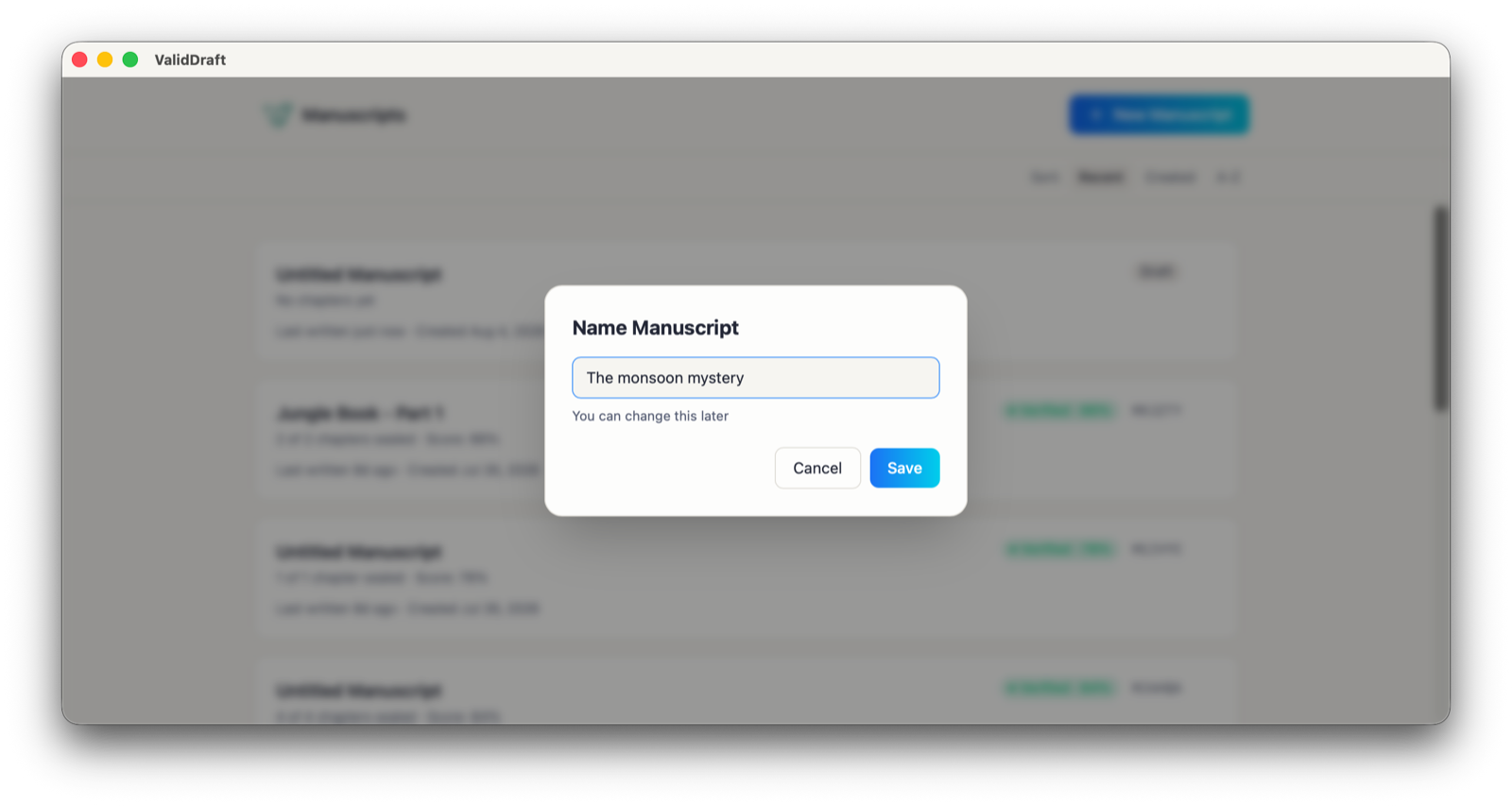
The tour starts with the least dramatic screen in the app. Click New Manuscript, give it a name, save. That is the entire setup - no plugin to bolt onto another editor, no folder to configure, nothing to remember to switch on.
The whole setup: a title. “You can change this later”.
One honest caveat: creating the manuscript registers it to your account, so this single step needs a connection - after that, nothing on the writing path does until you publish. From the first keystroke of chapter one, evidence collection is on, and everything it collects lives on your Mac first. (For the full install-to-export walkthrough, see the step-by-step getting started guide; this post stays with the evidence.)
Screenshot: writing with the evidence panel in view
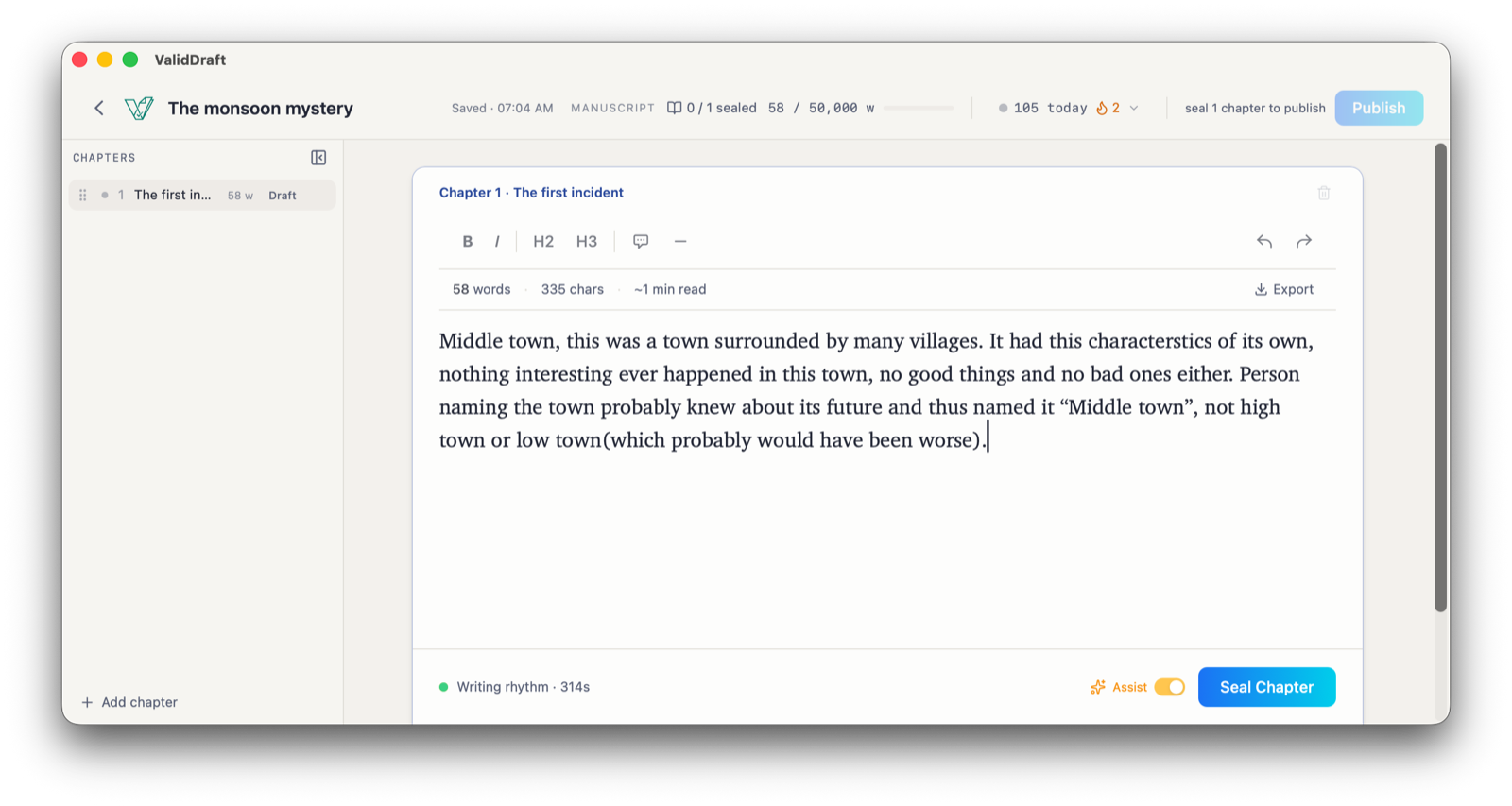
Here is the editor five minutes into the first chapter, fifty-eight words down.
Five minutes in: 58 words, 335 characters - and 314 seconds of recorded writing rhythm.
It reads as ordinary editor chrome, but every element is quietly answering one question: what will you be able to prove later?
Saved · 07:04 AM, in the header, is the sync state. It flips between Saved, Syncing, Offline, and - rarely - Sync error with a retry, whose tooltip carries the reassurance that matters: “Your chapter is saved on this device and will keep retrying.”
0 / 1 sealed and the still-inactive Publish button (“seal 1 chapter to publish”) track the path to the certificate. Publishing is earned chapter by chapter.
Writing rhythm · 314s, by the green dot in the bottom bar, is the typing-evidence journal at work: five minutes and change of rhythm recorded so far.
Seal Chapter is where a draft becomes a claim.
Look closely and you’ll spot “characterstics,” missing an “i.” We left it in. Real typing has typos - and the record treats the mess of drafting not as a flaw but as the evidence itself. Pauses, backspaces, corrections: that is what a person at a keyboard looks like, and the analysis reads it that way. (The Assist toggle is the app’s on-device writing helper - it finishes the word you’re typing and underlines grammar slips, and every accepted suggestion is noted in your writing record.)
Click Seal Chapter and, a few seconds later:
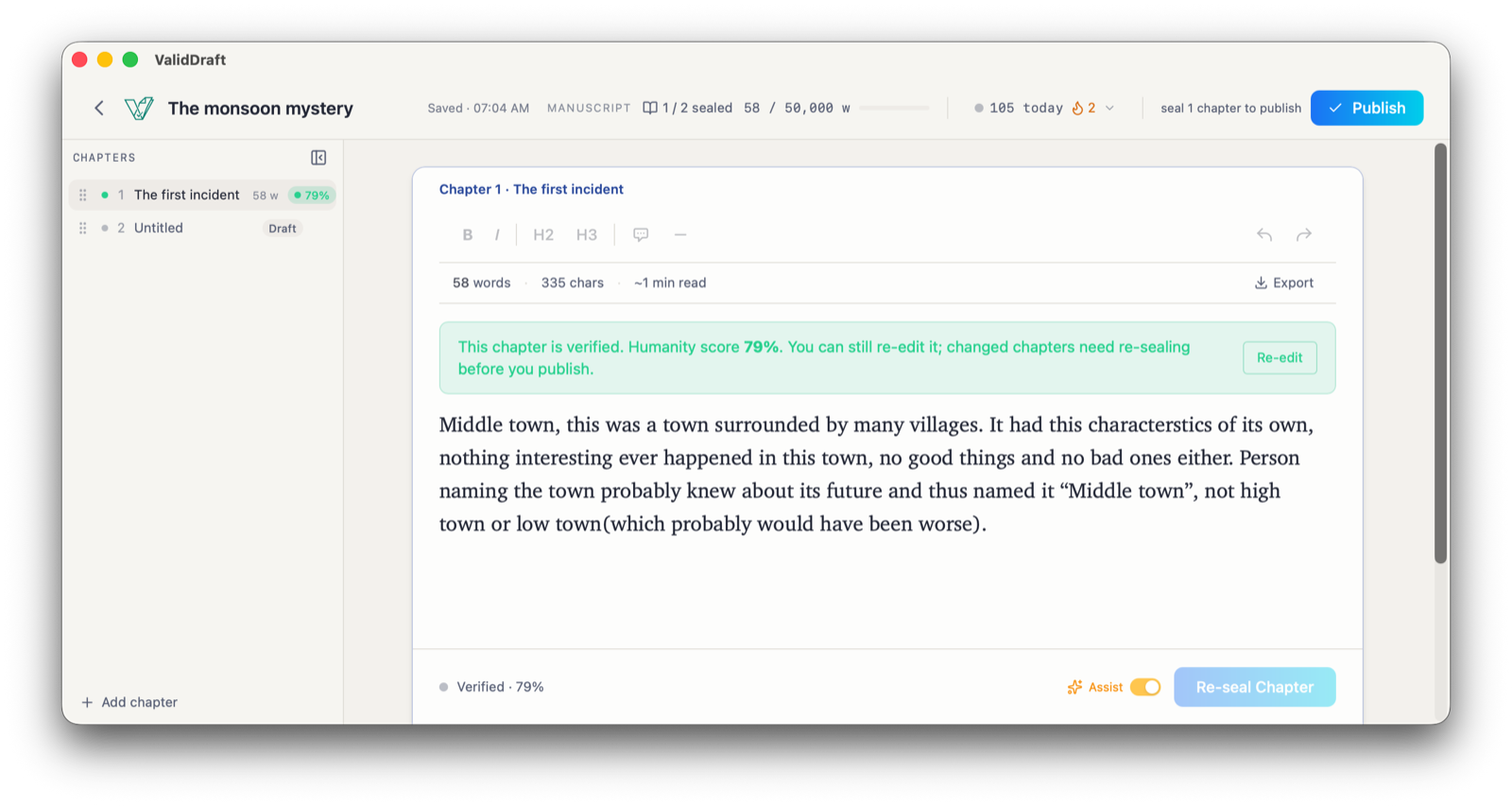
Verified at an honest 79% - and still editable. Changed chapters just need re-sealing.
“This chapter is verified. Humanity score 79%.” Note the number: 79, not a flattering 100. The analysis scored a real six-minute session and said what it saw - enough to clear the verification bar, so the chapter is verified. It also stays editable: change it, and it honestly reverts to needing a re-seal before you can publish.
How the evidence trail works - even with Wi-Fi off
Sealing is the one moment your words leave your Mac: the chapter text and its journal go to the server to be analyzed, because the scoring runs there, not on your machine. Which raises the question this app was built around - what happens to the evidence when there is no connection?
The answer is a pipeline that treats the network as optional at every stage before the score.
Writing never waits for a connection. Seals queue safely on your device and complete the moment you are back online.
While you type, journal events are banked to a local database in batches - every sixty seconds or every two hundred events, whichever comes first. Your chapter drafts are also written to an on-disk workfile, atomically, about a second and a half after you pause - and at least every five seconds even if you never do. When you’re online, batches upload incrementally in the background. When you’re not, they stay local and wait. Going offline pauses uploads. It does not pause evidence collection.
Sealing offline works too. The app doesn’t even attempt the request: the seal - chapter text, full journal, all counters - goes into a durable outbox on your device, and you see “Chapter 1 saved offline. It’ll seal when you reconnect.” The outbox survives quitting the app entirely. When the connection returns, queued seals replay automatically, oldest first, carrying their complete original evidence - an offline seal is not a weaker seal.
One thing to be honest about: the score itself arrives only after delivery. Offline, a seal is queued, not verified - the verdict comes when it reaches the server. Until then, the manuscripts list shows a plain banner (“1 chapter waiting to sync”), so nothing pending is ever invisible.
Closing the lid: crashes, restarts, and dead zones
Durability claims are easy to make and expensive to mean, so here is precisely what happens in the ugly cases.
Shut the lid mid-sentence. The editor autosaves every thirty seconds, and the disk flush runs seconds after your last keystroke. Reopen the MacBook on a train, in a tent, or a week later: the workfile hydrates your chapters straight back into the editor.
Quit while something is pending. Every exit path - Cmd+Q, the menu, the tray’s Quit, even the auto-updater’s restart - first waits for a final flush of unsaved changes to disk before the process exits.
Crash, force-quit, dead battery. The journal batches already in the local database and the drafts already flushed to disk are safe. What’s at risk is at most the last few moments of typing and evidence - the window between flushes. We won’t tell you “never”; we’ll tell you “a few moments.”
Come back after a week. The journal doesn’t pretend your book was one sitting. A resumed session carries an explicit session-gap marker, so the record shows what actually happened: a person, returning to a manuscript, across days.
None of this is sync magic. It is the older discipline of writing everything down locally first.
Screenshot: the sealed master certificate
Once every written chapter is sealed, Publish activates - the untouched empty tab that sealing auto-opens doesn’t count, which is why ours lit up at 1 / 2 sealed and the certificate reads 1 of 1. Clicking it doesn’t mint anything yet - first, the app tells you exactly what you are about to make public.
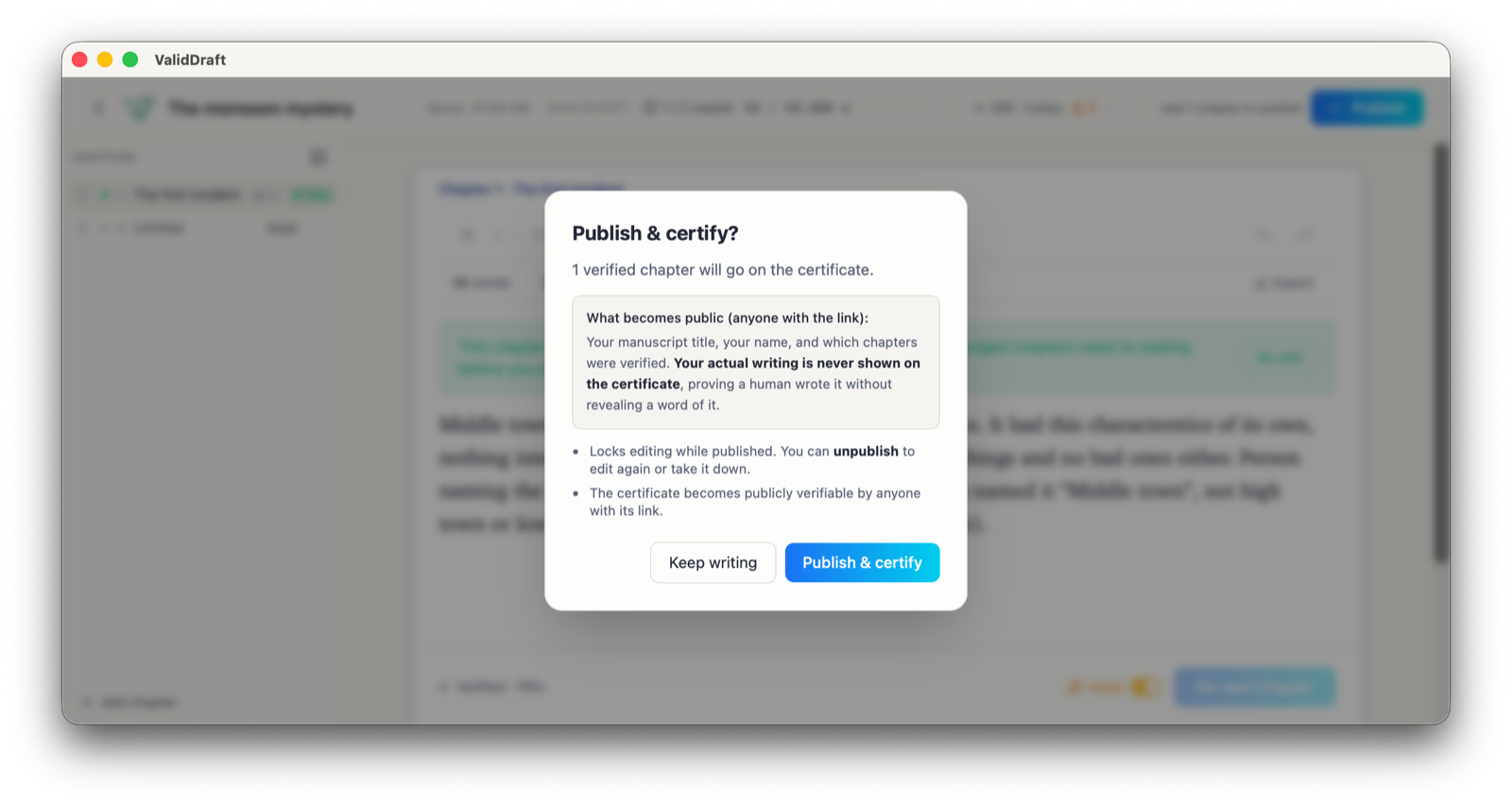
The publish dialog spells out what goes public - and what never does.
“1 verified chapter will go on the certificate.” What becomes public is your manuscript’s title, your name, and which chapters were verified - and, in the dialog’s own words, your actual writing is never shown on the certificate. It proves a human wrote the book without revealing a word of the book. Publishing also locks editing (unpublish any time to edit or take it down), and it is the other step that is genuinely online-only: the server binds the ordered chapter hashes into a Merkle root and signs it with Ed25519, minting the master certificate.
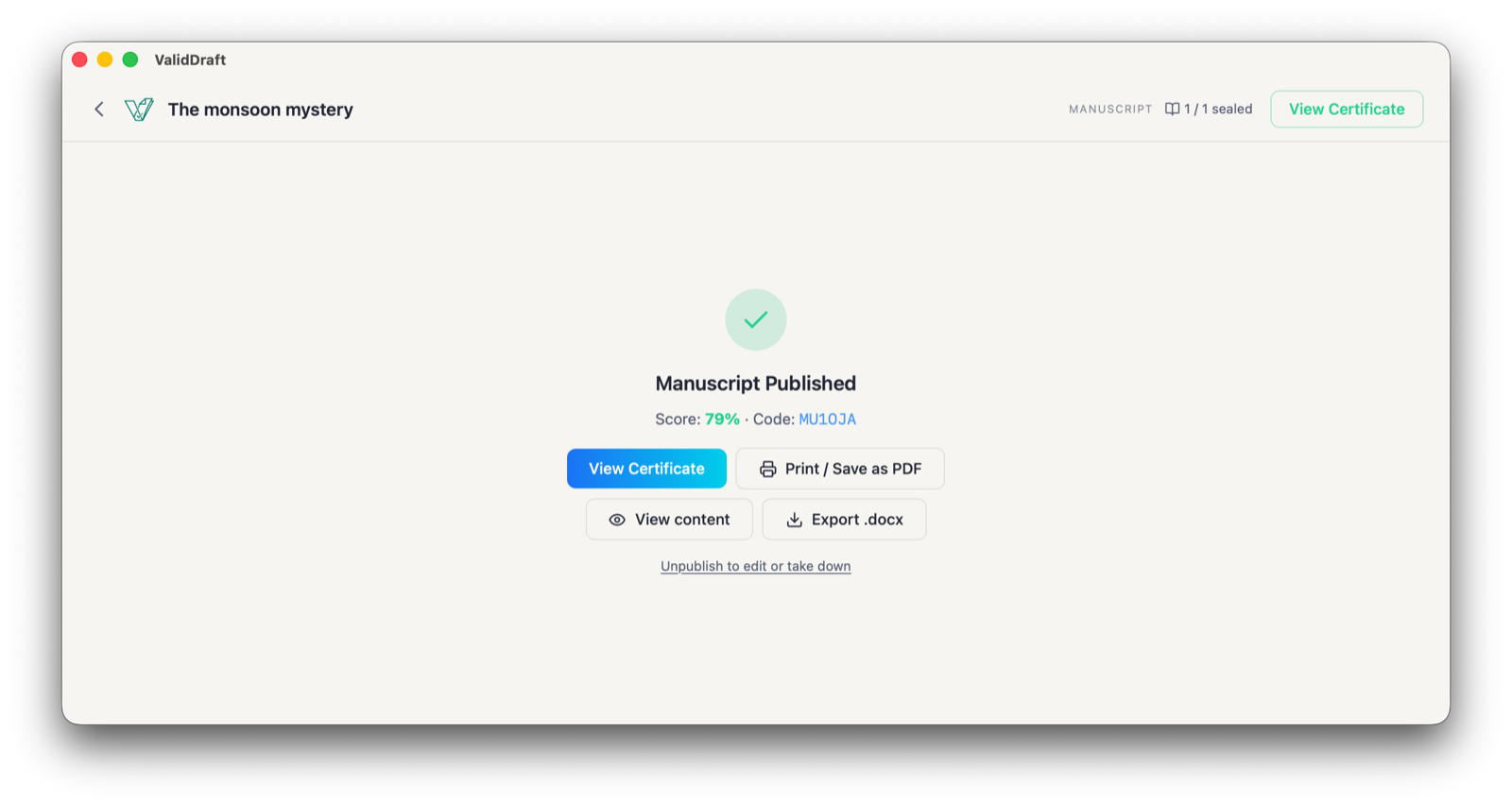
Published: score 79%, code MU1OJA, and every export within reach.
The confirmation screen hands you the score, the short code, and the practical actions - view the certificate, print or save it as a PDF, export the manuscript as .docx. And here is what the world sees:
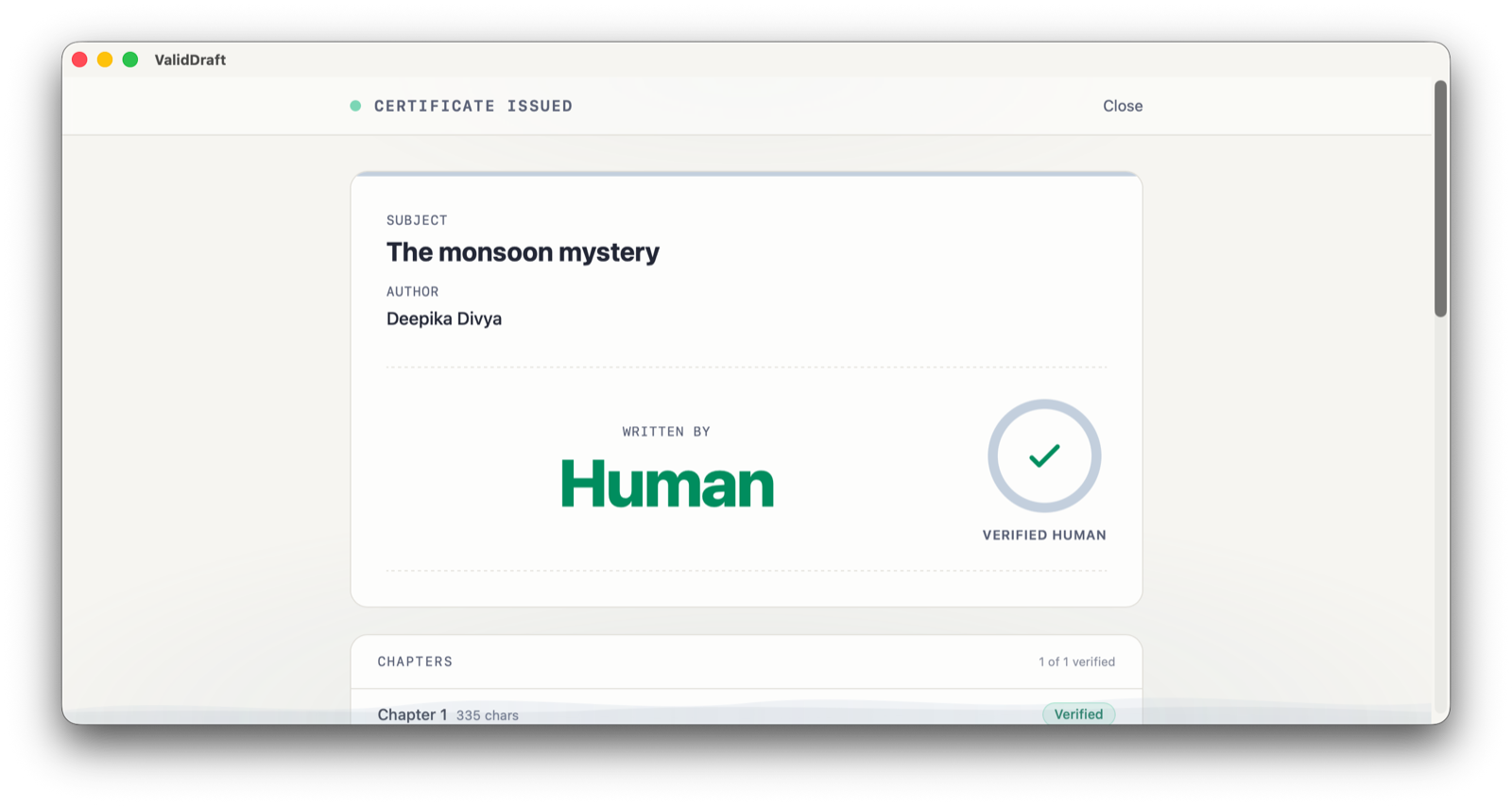
The public certificate: who, what, and Written by: Human. No score, no text.
Subject, author, Written by: Human, one of one chapters verified. Notice what it doesn’t say: 79%. The number is for you, the author. The public claim is deliberately binary - verified human - so there is no score for a stranger to misread out of context.
Scroll down the certificate and you reach the part that makes this proof of process rather than a stamp:
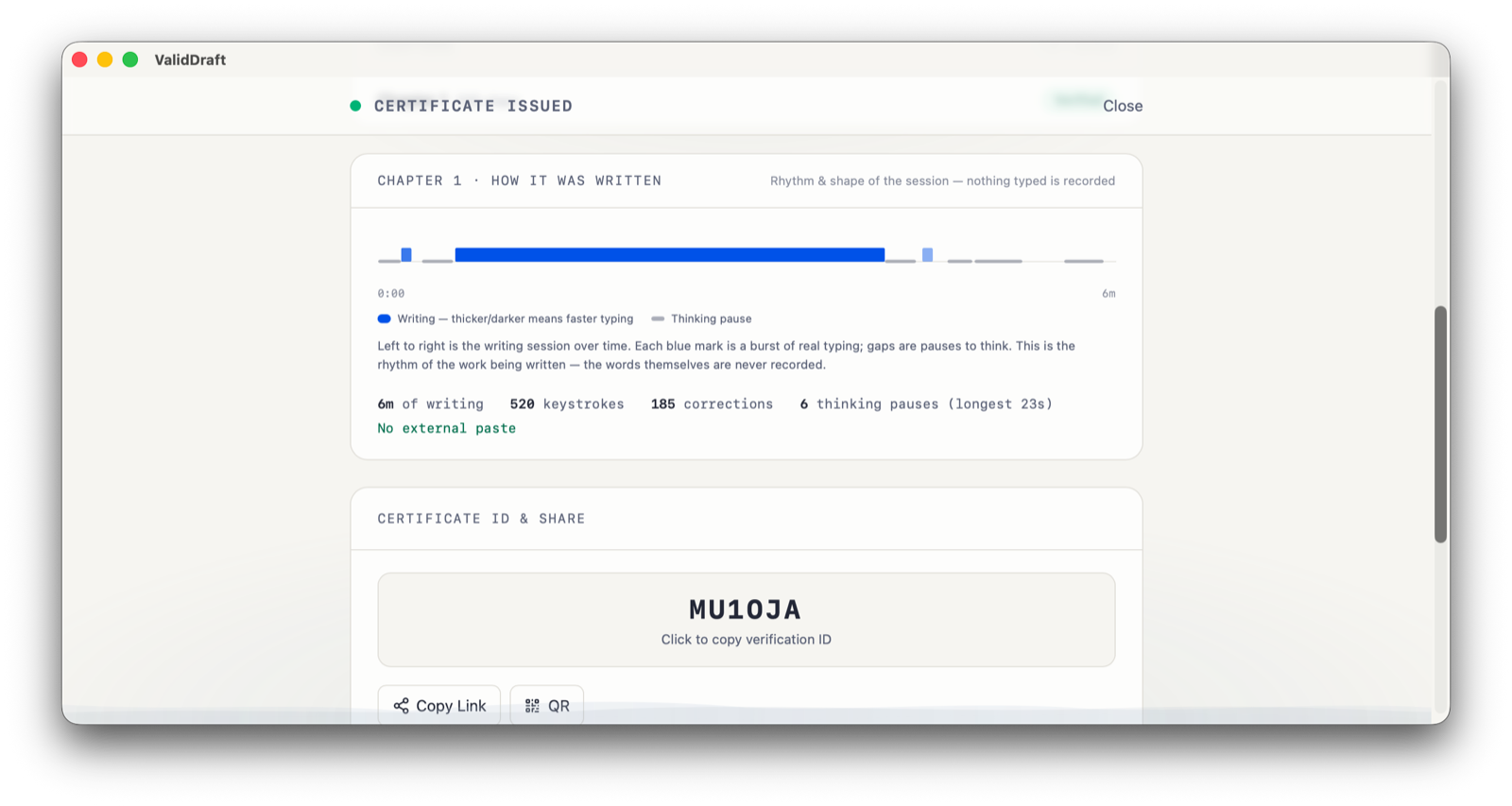
The “How it was written” panel: the session’s rhythm and shape - nothing typed is recorded.
The “How it was written” panel replays the shape of the session - blue bursts of typing, gaps where the writer stopped to think - from 0:00 to the six-minute mark, over numbers nobody could retrofit: 6 minutes of writing, 520 keystrokes, 185 corrections, 6 thinking pauses (the longest 23 seconds), no external paste. 520 keystrokes for a 335-character paragraph - the arithmetic of a person drafting, deleting, rewriting. And as the panel’s own caption says, it is rhythm and shape only: nothing typed is recorded. Below it sit the certificate ID, a copy link, and a QR code that resolves to this page.
Handing the evidence to someone who doubts you
Evidence is only as good as its worst-case audience: the skeptic who doesn’t know you, doesn’t use ValidDraft, and has no reason to take your word for anything. So the verification side asks nothing of them. Anyone with the link - an agent, an editor, a prize jury, a court - can open validdraft.com/cert/MU1OJA and see this manuscript’s certificate. No account, no install. Try it now, with this very manuscript.
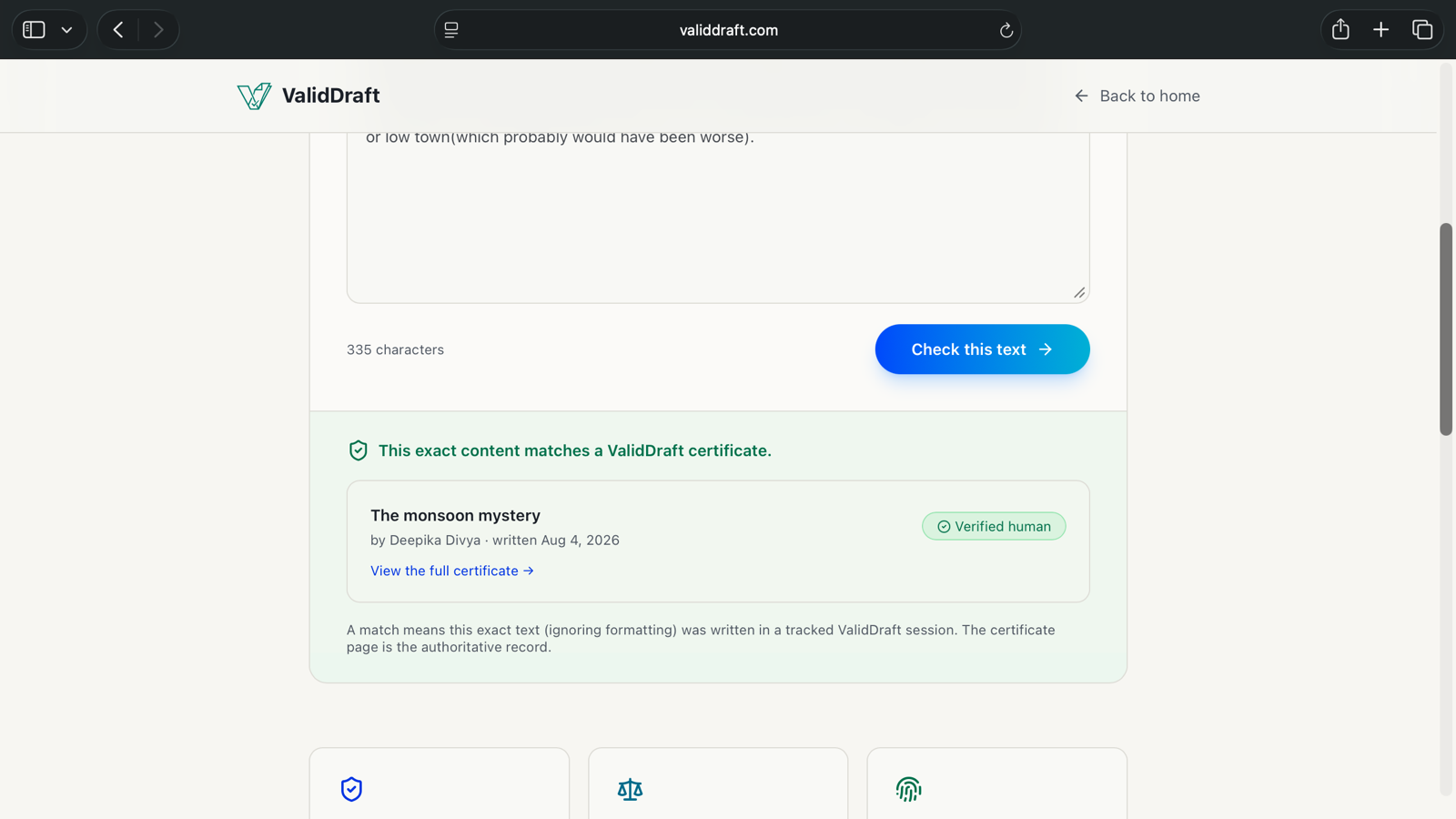
Doubters rarely arrive holding a link, though. They arrive holding text. For that, there is the public checker on validdraft.com:
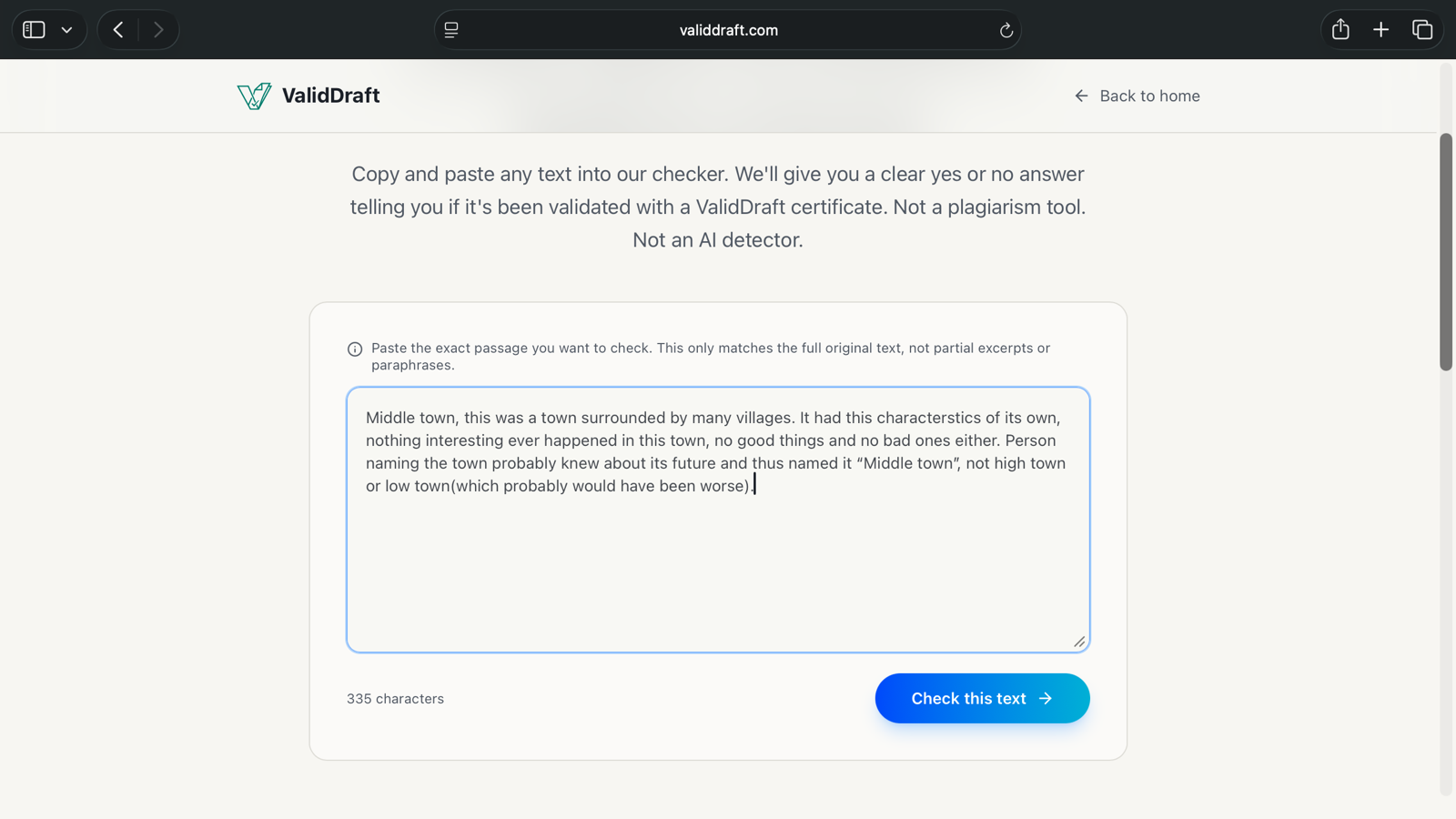
The public checker: a yes-or-no lookup. “Not a plagiarism tool. Not an AI detector.”
Paste in the same 335-character passage from the screenshots above, click Check this text, and:
The payoff: this exact text matches certificate MU1OJA - checkable by anyone, no account.
“This exact content matches a ValidDraft certificate.” The manuscript, the author, the date it was written, the Verified human mark, a link to the full record. The fine print is the point: a match means this exact text, ignoring formatting, was written in a tracked session - not a probability, a lookup against a fingerprint, with the certificate page as the authoritative record.
And because the master certificate carries an Ed25519 signature over its chapter hashes, it doesn’t even depend on us staying online: anyone can check the signature against our published public key, offline, years from now - how Ed25519 keeps certificates verifiable forever covers the math.
The one thing process evidence cannot do is be created after the fact. That is exactly why it convinces - and why the time to start the trail is before anyone asks.
Start the evidence trail before you need it
Write the next chapter in an editor that remembers how you wrote it. Seal as you go - with or without a connection - and finish with one certificate anyone can check.
Does ValidDraft for Mac work without an internet connection?+
Yes - the app is designed for indefinite offline writing. Chapter drafts are mirrored to a crash-safe workfile on your Mac's disk and restored when the app reopens, and evidence uploads simply pause and retry until you reconnect. Nothing about writing, saving, or evidence capture needs a connection at the moment you're writing.
What happens if I seal a chapter while offline?+
The seal - chapter text plus its full evidence journal - is written to a durable outbox on your device and replayed automatically when you reconnect or next launch the app; it survives a full restart. The humanity analysis itself runs server-side, so an offline seal is queued rather than scored instantly: the verdict arrives once the seal is delivered.
What evidence does the app actually record while I write?+
The process, not the content: typing events with millisecond spacing (for ordinary letters it records that a key was pressed, not which one), pauses, corrections, and paste events, kept in a journal that persists across app restarts. It records how the text came to exist in the editor - not your screen and not your other apps.
Can I lose evidence if the app crashes or my Mac dies mid-chapter?+
Very little. Evidence batches persist to a local database as you write, and drafts are flushed atomically to an on-disk workfile within seconds of your last keystroke. In a hard crash, what's at risk is at most the last few moments of typing and evidence - everything already flushed is safe and comes back on relaunch.
Can I paste in chapters I wrote somewhere else?+
Yes, via import - but imported chapters are permanently marked unverified, with no score and no path to a seal. ValidDraft only certifies what it witnessed being written, and that honesty is exactly what makes the sealed chapters' evidence meaningful.
What exactly does the master certificate prove?+
Publishing binds every sealed chapter's content hash, in order, into a Merkle root signed with Ed25519. The certificate attests that these exact chapters, in this order, passed process verification by the certificate's date - without revealing the text itself.
Can an agent, editor, or court verify the certificate without a ValidDraft account?+
Yes. Certificates are publicly verifiable by short code, link, or QR - no account required. And because the master certificate carries an Ed25519 signature, anyone can verify it against ValidDraft's published public key offline, without trusting our servers.